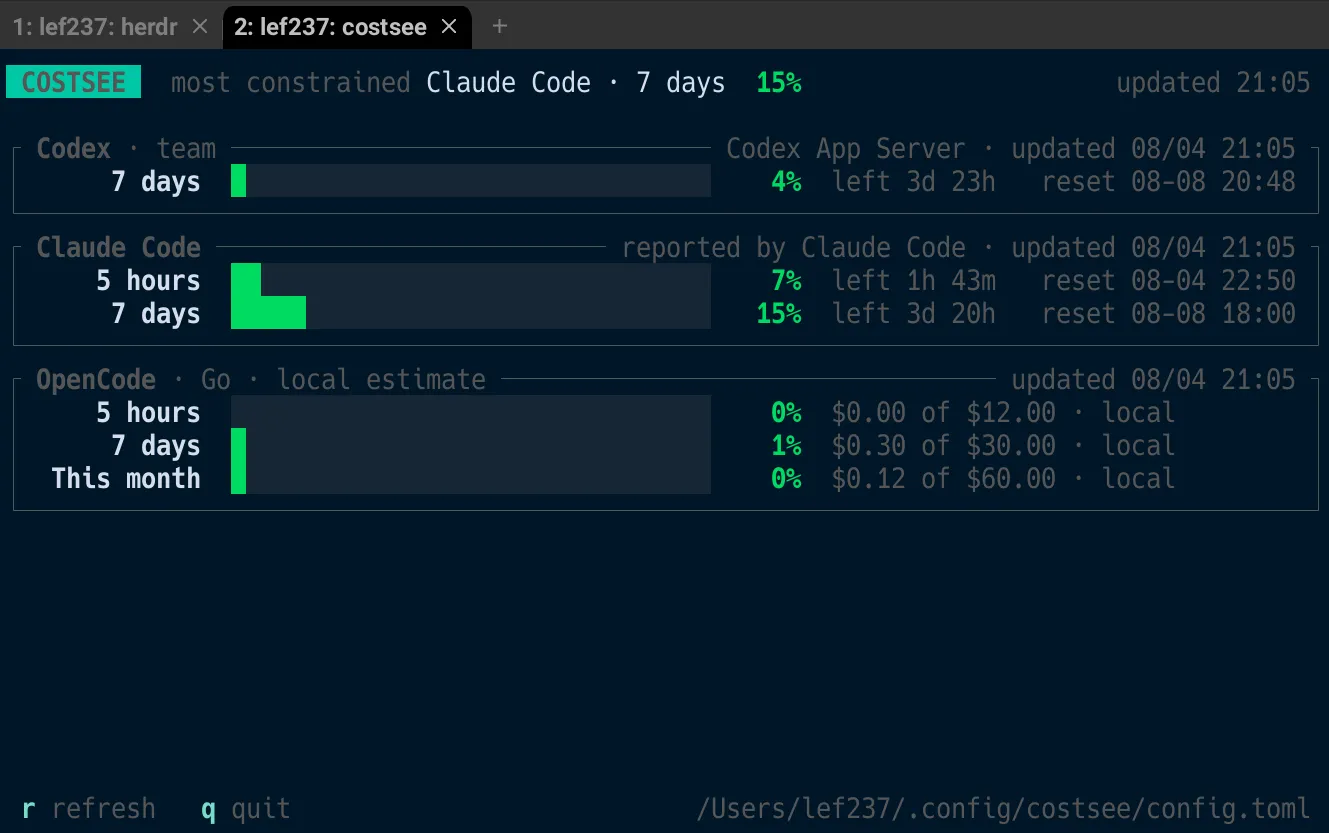
Many people probably use all three of these tools: Codex, Claude Code, and OpenCode.
For each tool, you need to check how much usage you have left today, how much of the five-hour window you have consumed, whether you still have room in your weekly limit, and whether you have exceeded your monthly budget.
Although all of these are fundamentally the same kind of information—remaining usage capacity—they must be checked in different places.
I created  costsee to solve this problem. It is a TUI application written in Rust that displays all of these usage limits together on a single terminal screen.
Know the Most Constrained Limit the Moment You Launch It
First, take a look at the actual interface.
 COSTSEE   most constrained Claude Code · 7 days  93%             updated 18:08

┌ Codex · team ──────────────────────── Codex App Server · updated 07/31 18:08 ┐
│        5 hours  ███░░░░░░░░░░░░░░░░░░   12%  left 2h 59m   reset 07-31 21:08 │
│         7 days  █████████░░░░░░░░░░░░   41%  left 4d 23h   reset 08-05 18:08 │
│  spend control  █░░░░░░░░░░░░░░░░░░░░    4%  left 19d 23h  reset 08-20 18:08 │
└──────────────────────────────────────────────────────────────────────────────┘
┌ Claude Code ────────────────── reported by Claude Code · updated 07/31 18:08 ┐
│        5 hours  ████████████████░░░░░   78%  left 59m      reset 07-31 19:08 │
│         7 days  ████████████████████░   93%  left 1d 23h   reset 08-02 18:08 │
└──────────────────────────────────────────────────────────────────────────────┘
I’ll also show you a screenshot.
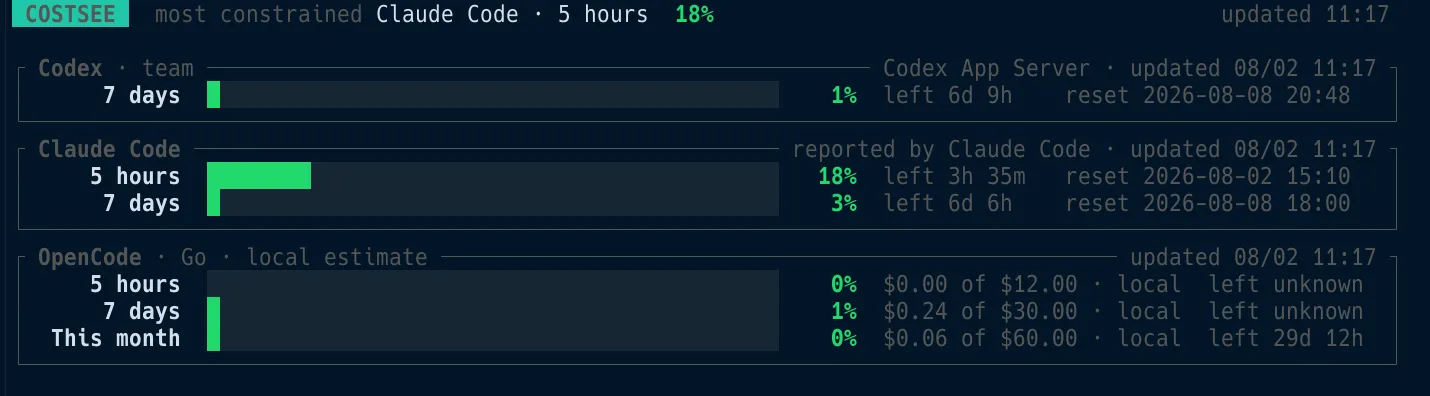
The bar and percentage columns use fixed widths shared by every tool. This lets you compare Codex’s 7 days limit with Claude Code’s 7 days limit simply by moving your eyes horizontally across the screen.
Even if each tool used a different width, you would still be able to read the individual numbers. However, you would no longer be able to compare them visually. Because the entire purpose of this tool is to view multiple tools side by side, consistent widths were a non-negotiable requirement.
Naming the Most Constrained Limit in the Header
The most constrained Claude Code · 7 days 93% message at the top of the screen serves this purpose. Before you read through each block individually, it tells you which limit is most likely to be reached first.
When the terminal is narrow, the message is shortened in stages according to the importance of the information. It first becomes 93% Claude Code · 7 days, and on an even narrower screen, simply 93%.
Changing Colors at Specific Thresholds
When usage exceeds 70%, the display turns yellow. When it exceeds 90%, it turns red.
The border around the entire block changes color, not just the individual row. This makes it possible to notice a problem as a change at the edge of your vision, even when you are not looking directly at the screen.
Showing the Time Remaining Until Reset
If the interface displayed only an absolute timestamp such as reset 08-02 18:08, the reader would need to calculate the difference from the current time mentally.
For that reason, costsee also displays the remaining time, such as left 1d 23h.
When deciding whether to continue working, the information you actually need is not the reset time itself, but how much time remains until the reset occurs.
It Also Works as a Claude Code Status Line
One somewhat unusual aspect of costsee is that it can run as Claude Code’s status line while also feeding the data it receives there into its own dashboard.
You can connect it with the following command:
costsee setupThis adds a statusLine entry to ~/.claude/settings.json. From that point onward, Claude Code calls costsee for every message, and costsee returns the following two lines:
Opus[high] · costsee(main) · ctx ███░░░░░░░  28% · $1.23
5h ████████░░  78% left 58m · 7d █████████░  93% left 1d 22h
The first line shows the state of the current session: the model name and its configuration, the working directory and branch, context consumption, and cost.
The second line shows the subscription usage limits.

Existing Status Lines Are Never Overwritten
If statusLine is already configured, costsee exits with an error without modifying the existing settings in any way.
It then explains how to add costsee capture-claude to the existing script and pass standard input to it.
Values Update Without Interrupting Your Work
Because the cache is updated whenever you interact with Claude Code, costsee monitors the modification time of that file.
When it detects a change, it automatically retrieves the latest data and displays ✓ auto-refreshed in the footer.
Leave costsee open in an adjacent pane, and the values will continue to update simply as you use Claude Code.
To refresh manually, press r.
One detail here is that communication with the Codex App Server can sometimes take time. For this reason, costsee draws refreshing… before it begins collecting data.
This avoids leaving the user in front of an apparently unresponsive screen without any indication that processing is underway.
When the refresh completes, ✓ refreshed appears for three seconds and then quietly disappears.
Press q or Esc to exit.
Using It from Scripts
There are also situations where you want to retrieve only the numbers without opening the TUI.
In that case, use the following command:
costsee reporttool window used reset status
Codex 7 days 2.0% 2026-08-05T20:59:27+09:00 ok
Claude Code 5 hours 23.5% 2026-07-29T22:00:00+09:00 okPrivacy Is a Design Requirement
Because this tool handles usage information, I established clear boundaries from the beginning regarding the data it is allowed to access.
- For Codex, costsee temporarily starts the official App Server over stdio and reads only the result of
account/rateLimits/read. It does not read session logs or authentication credentials. Codex’s own authentication is used directly, so costsee never takes possession of an API key. - For OpenCode, costsee opens the local SQLite database in read-only mode and reads only timestamps, providers, and costs. It never accesses conversation content.
- For Claude Code, costsee caches only usage percentages and reset times. The model name, directory, context usage, and cost shown in the status line are rendered directly from the input and are never written to disk. Session IDs and transcript paths are neither displayed nor stored.
- No telemetry is transmitted.
One additional point regarding OpenCode is that there is currently no official API that can accurately aggregate usage by time window without reading conversation text.
For this reason, access to the local database is isolated to the smallest possible scope. When costsee encounters an unexpected data format, it gives up rather than producing an estimated value.
Configuration
Codex is detected without any additional configuration.
OpenCode, however, supports multiple providers and therefore does not have the concept of a single shared usage limit. You must configure the spending limits yourself.
First, generate the configuration file:
costsee initThen enter the official OpenCode Go limits in the generated ~/.config/costsee/config.toml file:
[allowances.opencode_go]
five_hour_usd = 12.0
weekly_usd = 30.0
monthly_usd = 60.0
The configuration-file path is standardized as ~/.config/costsee/config.toml on every operating system.
If the location varied between operating systems, it would create difficulties for people who share dotfiles across multiple environments.
You can also use the --config option to specify any path you prefer.
If codex is not included in your PATH, you can specify the executable path as follows:
[commands]
codex = "/path/to/codex"
One point to be aware of is that the exact reset times for the five-hour and weekly OpenCode Go limits cannot be determined from local history.
For those two limits, costsee displays unknown.
Here again, the policy is to state clearly when something is unknown.
Installation
Building costsee requires Rust 1.89 or later because it uses std::fs::File::lock when updating the Claude Code cache.
cargo install costsee
costsee
The main dependencies include ratatui 0.30, crossterm, rusqlite with the bundled feature, clap, and chrono.
At approximately 2,600 lines of source code, it is a relatively small tool.
Conclusion
The biggest change since I started keeping this tool open is that I now spend almost no time worrying about usage limits.
Previously, I would check three separate locations whenever I felt uneasy, but now I can simply verify the information on one terminal screen.
If the display has turned red after exceeding 90%, I can decide within seconds to postpone a resource-intensive task until the following day.
The repository is available below. Feedback and issue reports after trying it are welcome.
